October 27, 2015

Undercover Boss - School Style!

Guest post by Michelle of Teach 1, 2, 3


I was watching one of my favorite shows, Undercover Boss, when I had a brainstorm! What if a legislator, congressman, State Superintendent or Commissioner of Education went undercover in the schools in their districts? They would see the impact of the decisions that they make. It would be first-hand experience, much better feedback than what they normally receive.

If you haven't seen Undercover Boss, you can click HERE to watch the first few minutes of an episode on YouTube. But be sure to return to Corkboard Connections to read how the undercover boss concept might work at school.

If you listen to many conversations or read many posts involving education, you will often sense a negative tone. Teachers are facing more and more pressures today. Critics of new curriculum and standards, larger class sizes, less resources, and the list could go on and on. Is it any wonder that administrators, school leaders, and the Sunshine Committees are often searching for ways to support the staff and improve the school climate?

Undercover Boss - School Style

While it might be a pipe dream to have our government leaders spend a day as a teacher undercover, I do think administrators could do a modified version of it. Everyone at the school knows the administrator, so the undercover portion of Undercover Boss would not work. But, the principal could go back to the classroom and walk in your shoes. He or she would gain some of the same valuable insights that the people on Undercover Boss do. What is a strength and weakness of the new curriculum? How are the students adapting to the school wide behavior plan? Can the class hear announcements? Is there enough time to get the class through the lunch line? He or she could also see the impact of other decisions that are made by the administrative team.

Choosing a Class to Visit

An administrator is a busy person so how would he or she decide whose class to visit? This can be organized in a variety of ways. Here are two suggestions:
  • Reward - Put all of the names of the staff members who have perfect attendance for the month in a hat. Draw a name (or two,three . . . ) out of the hat. Those names are the winner of a 30-minute break when the administrator teaches a lesson. You may find that your attendance rate goes up which is a win-win for everyone! 
  • New Teachers - I don't know about you, but when I began my first year of teaching, I was completely overwhelmed with all of the hundreds of details and decisions that I had to make in a day. I really wished that a mentor would had modeled strategies with my class instead of giving me a list of what I needed to work on before we met the next time. It would had been more beneficial if I could have seen these strategies in action rather than verbally telling me what to do or handing me a book or article. A principal would be the perfect person to do this since he or she knows these students, sometimes for years and shaping the career of a new teacher has to be (I would think) one of the more rewarding aspects of the job.


Undercover Story Time With Your Principal

An easy way to implement Undercover Boss - School Style is for your principal to schedule a Story Time visit with each classroom. One of my former principals visited each class at the beginning of the year to read his favorite book and talk about what school was like when he was in that grade. It was a great way for the principal to introduce himself to the students. Students found ways to connect with him through the story time lesson. I often saw them talking to him in the hallway or lunch about topics brought up in his lesson. He share things like: playing soccer, favorite cartoons, and his favorite subject in school. All topics that are an instant hit with students!

It not only built relationships with students, but those same children went home excited about how their principal who was so "cool" and played soccer like them. I had several parents comment on how impressed they were that a busy principal would take the time to visit classes and do something like this. These visits were scheduled during the first month of school because he knew teachers have endless amounts of paperwork. Although we were asked to stay in the classroom, we were allowed to work on paperwork or other work that did not involve the students. This was like a 30-minute gift of time for us when we needed it the most. This was a wonderful community building activity that I highly recommend.

Story Time Freebies
If you are a teacher and you would like your principal to bring story time to your classroom, be sure to share this post with him or her. If you are a principal and would like to try this activity, I have some free printables for you. Here's what's included:
  • Signs: color and black/white
  • Schedule your story time visit with the teacher
  • Reminder about your visit
  • 3 reading response assignments 
There are 3 variations of the reading response assignment that you can use in different grade levels or to differentiate in one class. If you don't want to assign them yourself, you can give them to the teacher after your lesson.


Are you on the administrative team or have an administrator who likes to try new things?  Does Undercover Boss - School Style sound like something you or someone you know would like to do? If so, try one of these ideas or tell us your how you did it in the comment section below.  Learning and sharing from each other is one of the best parts of the blogging community.

I enjoy writing about how to have a happy school. I have compiled some of my posts about this topic on a page of my blog and will continue to add to the list as I add more posts. Click on the picture above if you'd like to read more ideas about this topic. Thank you Laura for inviting me to visit your blog today!

Michelle is the creator of the Teach 1, 2, 3 blog where she shares her teaching tips and classroom management strategies. She's taught in a variety of schools, both large and small, as well as public and private, and this wide range of experiences is evident in her teaching materials. 

October 15, 2015

The Question Connection for Elementary Educators

If you follow my Teaching Resources Facebook page, you may have seen my Question Connection posts. This is a regular feature where teachers can ask questions, and other educators respond with links to resources and helpful advice based on experience.

Submit Questions Anonymously
The only problem with submitting a question on Facebook is that up until now, there hasn't been a way to share it anonymously. But sometimes a topic is just too sensitive for you to want to post your question publicly.

Problem solved! Just submit your question via this private Google Doc form, and if it's a good fit for my Facebook page, I'll be happy to post it for you sometime in the next week or so. When you submit your question, you'll be asked to enter your first name, but you can make up a name if you want the question to be anonymous. To get started, click HERE or the Question Connection form below.

What are "Good Fit" Questions?
Because a lot of questions are submitted, I'm not able to share every question that's submitted. So I review all questions and select the ones that I think will be most relevant to elementary educators because they are the primary followers of Teaching Resources. What kinds of questions are a good fit for the page? You can ask for links to curriculum resources, advice about how to deal with classroom management issues, book suggestions, information about new online tools, etc. If you aren't sure if your question is a good fit, submit it anyway because you never know!


Don't Miss the Responses to Your Question!
My Facebook page has over 670,000 followers, so if your question is shared, it's likely to get some pretty amazing responses! I've seen questions that had over 100 responses! To be sure you don't miss them, click over to the Teaching Resources Facebook page and click the Like button to follow it. If you don't see your question after a few days, scroll through the posts on the timeline to see if it's there. 

Share Your Advice and Expertise
Teachers sharing their advice and expertise make up the other half of the Question Connection. So if you see a question you can answer, please jump in and help! Your advice might offer just the right solution for another teacher reading the post. Through the power of social media, you'll be making a impact beyond the walls of your classroom. Trust me, a teacher somewhere will be thanking you!


Got teacher questions? Ask and answer them on the Teaching Resources Facebook page because the best advice comes from real teachers!

October 8, 2015

20 Terrific Quiet Signals That Work!

Advice from Real Teachers Series
What's your favorite quiet signal? Check out these terrific quiet signals that include everything from call and response strategies to fun noise-making objects like train whistles and rain sticks!
When you teach hands-on lessons and use active engagement strategies, it goes without saying that you MUST have an effective quiet signal! You'll use it over and over again, so it can't be too annoying, and it needs to be something that will get your class quiet in less than 5 seconds.

I shared my favorite quiet signal on my Teaching Resources Facebook page and asked the followers to share their favorites with me. I loved the quiet signals that were shared so much that I decided to compile the responses as a post in my Advice from Real Teachers series. If you want to read my original question on Facebook and see the responses for yourself, click here.

20 Terrific Quiet Signals That Work! 
My favorite quiet signal is the set of chimes below, and I shared this image when I posted my question. Several teachers agreed with me and explained how they use chimes in their classrooms. Other favorite quiet signals included a mixture of "call and response" strategies as well as a variety of fun noise-making objects like a train whistle, a concierge bell, and a Tibetan singing bowl! I've included Amazon links* for those items so you can learn more about them if you're interested.

  1. Carol Hunt - Chimes...works like a dream! I use it to transition center activities. 
  2. Karen Swales - I had a set of these chimes in my classroom. They were especially effective with students with sensory processing issues and children on the autism spectrum.
  3. Reuben Hks - I raise my hand, and then students raise their hands and stop talking. This gives students a chance to finish their conversation if they are talking with a partner or working in a group.
  4. Pepper Sullivan - I use non-verbal signals.  I hold up 5 fingers and move about the room.  As students notice and start to pay attention, I drop to 4, then 3, then 2, then 1 as they all get quiet.
  5. Linda Legman - I say , "1, 2, 3,  look at me!" They respond, "1, 2,  look at you!"
  6. Sam Shaw - I've got a plastic dog toy duck that I squeeze.......it quacks.....I've also got a silly bike horn....
  7. Deborah Brooks - I have verbal cues as I am all over the room and won't readily have something nearby to chime and such. I usually say " Awesome!" And they reply "POSSUM"!
  8. Kelli Jo Wusterhausen  - One I learned from a colleague was "and a hush falls over the crowd" and they say "hushhhh" and the listen. 
  9. Jillian Bishop – A Tibetan singing bowl works well  
  10. Rosemary Montenegro - I flicker the light and say, in a very upbeat voice, "Show me your listening wings!" The kids stop what they're doing and stretch their arms out to let me know that they are listening!
  11. Matt Hill - I say "Sharkbait" and they say "Ooh ha ha" and freeze.
  12. Mindy Halverson - My favorite is a throw back to Vanilla Ice. I say "Stop" and the kids respond with "Collaborate and listen." I teach them how the song does it. We also talk about what collaborate means. I have had some groups that really got into it which made it more fun.
  13. Jaqui OShaughnessy - A wind chime. SO gentle and always gets the kids' attention.
  14. Casey McAdam - I say, "Hands on top, that means stop."  The kids stop playing because their hands must touch the tops of their heads.
  15. Karen Swales - For something more hands on, a Kalimba is a very soothing (and quiet) instrument. It's very calming when the student holds it with both hands to play. I found one similar to this at a local craft fair. 
  16.  Phillip Gumery - I use the simple ringtone on my mobile. It’s loud enough to get attention and works as a quiet time signal as well.
  17. Peter Jarvis - One classroom I saw had a remote doorbell. The button was on the teacher’s desk and the chime part somewhere in the classroom.
  18. Alicia Figluizzi - I use this bell and teach my high school students two signals. One ding means simmer down, be aware of noise/transition, and two quick dings means I need the whole class's attention or a transition is about to occur.
  19. Amanda Becker - I have 7 things. Haha - variety!  1. Concierge bell  2. Train whistle - mostly for clean up  3. Rainstick  4. Peace sign with my fingers 5. Coconut piano chime (it's awesome!) 6. Rhythm clap  7. Call and respond techniques
  20. Shawn Collins - I teach my students to respond to my verbal call in the same way. .. For example, If  say,  "Claaaaaaaassss." They respond "yeeesssssss?" I switch it up using a southern drawl, a British accent, and so on.  (This strategy was originally developed by Chris Biffle, founder of Whole Brain Teaching, and you can read more about it here.) 
What's your favorite quiet signal? Check out these 20 terrific quiet signals that include everything from call and response strategies to fun noise-making objects like train whistles and rain sticks!

How to Teach Your Quiet Signal
After you choose a quiet signal, it's important to teach it to your students so they know exactly what to do when they see or hear your signal. After you explain the procedure, have them practice it right away. Ask your students to pair up and discuss a topic of interest. After they've been chatting for 15 or 20 seconds, use the quiet signal. Then time your class to see how long it takes them to get quiet. Write the time on the board and challenge them to get quiet in under 5 seconds. Continue practicing until the class is able to accomplish this. It won't take as long as you might think! 

Having an effective quiet signal is one of the best ways to maximize instructional time. Instead of wasting precious minutes trying to get your class quiet so you can give the next set of directions, you'll have them quiet and ready to listen in 5 seconds! To learn more strategies for using quiet signals, click over to my Teaching Resources website.

Which of the 20 quiet signals shared here do you already use? Which new ones would you like to try? If you have your own favorites, I hope you'll share them with us in a comment on this post! 


*The links to products on Amazon are affiliate links. If you make a purchase after clicking on one of these links, you will not pay anything extra. However, I will earn a small commission on those sales which helps to support my work creating resources for teachers. Thanks!


September 22, 2015

Spelling Stories - Creativity Unleashed!

Tips for assigning spelling stories ... great way to unleash your students' creativity!
Have you ever asked your students to write a story with their spelling words? It may not seem like the most original assignment, but the resulting stories are always tremendously creative!

This assignment may not sound exciting, but it's an extremely effective way of assessing how well your students understand their spelling words... and the stories are fun to read! If you don't believe me, just read the spelling story below that was written by Derrick, one of my former students!

Here are some practical tips to help you unleash your students' creative talents with spelling stories.

Tips for Assigning Spelling Stories
For several weeks before you ask your students to write stories with their spelling words, have them write spelling sentences. For that assignment, I allowed them to choose 10 of their spelling words and to write a complete sentence that showed the meaning of each word. It was only after they mastered that assignment that moved on to spelling story assignments. Here are the basic directions I gave my students; feel free to modify them according to your students's needs. I allowed them to change the form of the word slightly, such as making it plural, changing the verb tense, and so on.
Use at least 10 of your spelling words in a short creative story. The story can be silly, but it must make sense and must be more than a collection of unrelated sentences. Underline all spelling words used in the story. You may use other forms your spelling words, but be sure to spell them and use them correctly.    
Creativity Unleashed
Sample spelling story in blog post by Laura Candler with tips about assigning and scoring spelling stories.Most spelling lists include unrelated words, so students must be very creative in order to include at least 10 of them. I don't mind if the stories are short as long as they meet the requirements. Sometimes the funniest and most creative stories are the shortest ones! I'll bet you have at least one student who likes to take shortcuts on assignments. If your students are like mine, they will write the most hilarious stories just to get the assignment done with the fewest words possible! Click the story on the right to read Derrick's story, a perfect example of creativity unleashed! He used 14 words in a story that wasn't even a full page long.

Tips for Grading Spelling Stories
Spelling stories can be tricky to grade, but if you're going to grade them, it's important for your students to understand your grading policy. Rubrics are perfect for grading these types of assignments because they keep you from being too subjective. You can download and use my Spelling Story Rubric from the Spelling page on Teaching Resources if you like it, or modify it if needed.ips for assigning spelling stories ... great way to unleash your students' creativity!
Each of the 5 criteria on the rubric can receive up to 5 points. After you assign the points and total them, you can use the scale at the bottom to convert that total to a letter grade. I suggest sharing the rubric with your students and their parents before they write their very first story. You might even want to write a sample story that contains errors and show your students how that story would be graded. Then display Derrick's story example shown above and have your students help you score it with the rubric.

Free Spelling Story Rubric included in post with tips for having students write spelling stories.

Tips for Sharing Stories
At some point during the writing process, be sure to provide an opportunity for students to share their stories with their classmates. If you have a class blog or website, post the stories online for everyone to read there. Morning meetings and author sharing times are great opportunities for sharing, too. Our favorite time to listen to spelling stories was Friday afternoon when everyone was packed up and we were waiting for the final bell to ring. I would call on volunteers, one at a time, to sit on my teacher stool and share their spelling stories. It was a fun way to wrap up the week and always left us laughing as we walked out the door!


September 18, 2015

6 Reasons to Teach Calculator Skills

6 reasons to teach calculator skills to upper elementary students, including how calculators foster mathematical thinking. Free calculator quiz in the post!
When North Carolina first began to allow calculators on state tests, many elementary teachers (including me) were shocked! What? Kids need to develop basic computation skills before they are allowed to use calculators!

Then we got a look at the new state math test. Holy moly! The test was divided into two parts, a calculator-inactive section, and much longer calculator-active part that was made up entirely of word problems! I realized that if my 5th graders had to work out every answer by hand, they would never finish the test! I also realized that it wouldn't be fair to hand out calculators for the first time on test day. In short, I needed a new game plan.... one that involved calculators.

Calculators Are Not Magic - You Still Have to Think!
Most students are intimidated by word problems, so when I decided to introduce calculators, I felt that our problem-solving lessons would be a good place to begin. When I first handed out the calculators, my students were so excited! They seemed to think those calculators were going to magically solve the problems for them! It didn't take long before my students realized that calculators are not magic at all! Why?
  1. You still have to read the problem, choose a strategy, decide which operation to use, record the answer, and check the solution using a different strategy. In other words, you still had to THINK!
  2. Calculators aren't helpful with some types math problems, so you needed to know WHEN to use it and when it might be a waste of time.
  3. You have to know HOW to use the calculator in order to get the correct answer. The data from the problem must be entered in a specific way, and if you enter it incorrectly, you'll get the wrong answer every time. 
  4. You have to know how to interpret the number that appears in the display window when you finish entering the data, especially in problems involved time, measurement, and money.  
Why and How to Assess Calculator Skills
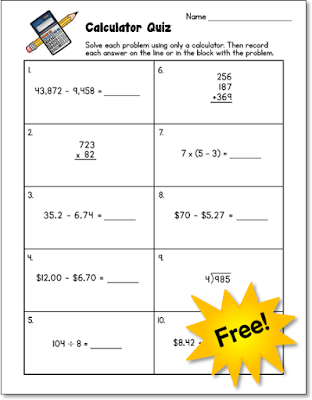
Do your students know how to use a calculator? You won't know for sure unless you assess those skills! Download this freebie to use in your classroom.
After they got over the disappointing realization that calculators are not magic, my students began to enjoy using them and looked forward to problem solving lessons.

However, I soon noticed that some students knew how to solve the math problems, but they were getting the answers wrong because they didn't know how to use their calculators properly. Time for some calculator lessons! I knew that some kids didn't need the extra help, so I created a simple 10-item Calculator Quiz to find out who did. You can download this free assessment from my Daily Math Puzzlers page. When I handed out the test, I told my students that they were not allowed to work out any problems on paper. They were required to use their calculators and they could only use their pencils to record their answers. Needless to say, they were shocked! "You mean we can't work out the problems on paper even if we WANT to?" "Nope. Sorry. Only the calculator."

After I scored the tests, I taught several guided math group lessons to the students who were having difficulties. The other students used the time to work on math center activities. Then I retested the kids who I had worked with to be sure they had mastered the basic calculator skills. These lessons were so successful that I included calculator instruction in each Daily Math Puzzler book.

6 Reasons to Teach Calculator Skills to Upper Elementary Students
So why should we teach upper elementary students how to use a calculator? Based on my own experiences and feedback from other teachers, I am convinced that calculators boost mathematical thinking and are motivating to students. Here are 6 reasons to teach calculator skills and to encourage your students to use them to solve math problems.
  1. Calculators help kids overcome computational limitations.
    Kids often have the conceptual understanding to solve problems that are much more difficult than their computational ability would allow. For example, a student might know they need to divide a 2-digit number by another 2-digit number, but if he or she hasn't mastered this skill, the answer will be out of reach without a calculator. Overcoming computational limitations is especially helpful for special needs students and actually removes barriers to more advanced levels of math instruction.   
  2. Calculators encourage the use of multiple strategies.
    Being able to use a calculator frees students to consider and test out a wide variety of problem solving strategies in a short time. They can solve a problem using one strategy (without or without a calculator), and check their answers using a different strategy. 
  3. Calculators help kids solve more problems in less time.
    Calculators allow students to work more quickly, which means they can solve more problems in a given time. So you can increase the number and complexity of the problems you introduce in each lesson without increasing the time devoted to problem solving lessons.  
  4. Calculators promote persistence in problem solving.As students begin to think more creatively and try different methods, they will experience success with some methods and failure with others. But it's HOW they feel about those "failures" that's important. I noticed my students were less discouraged when they couldn't solve problems quickly; they tried to figure out WHY their methods didn't work. Then they adjusted their thinking and tried a different strategy.     
  5. Calculators foster a growth mindset.Educators are starting to realize that praising students for correct answers is not nearly as important as recognizing their struggles along the way. When students are able to persist and try different strategies to solve challenging problems, they feel a sense of accomplishment and pride in themselves for not giving up which leads to the next benefit.  
  6. Calculators promote a positive attitude towards problem solving. As the saying goes, "Success breeds success," and that's definitely true in math. Using a calculator drastically increases the chance that a student will get the correct answer, and the subsequent feeling of accomplishment promotes a more positive attitude toward the next problem.  
What If Your Students Are Not Allowed to Use Calculators on Standardized Tests?
Is there any benefit to using calculators during the school year if your students are not allowed to use them on standardized tests?  Yes! Your students will still benefit from using them early in the year to boost their mathematical thinking, as long as you devote sufficient time to teaching and reviewing computation. As the year progresses and your students' computation skills improve, you can gradually wean them off calculators completely.

When Should Calculators Be Introduced?
I introduced calculator skills early in the year because my students were 5th graders who had developed a fairly solid understanding of numbers and what they mean. I don't advocate giving them to young children who have not had time to develop number sense, because entering numbers into a calculator won't be meaningful to them. You are the best judge of when your students are ready to begin using calculators. However, if you observe your students randomly punching numbers in as if they are hoping to stumble on the answer, it might be time to put the calculators away for a while and focus on math problem solving strategies.


Learning to use a calculator had a tremendous positive impact on my students' mathematical thinking and their willingness to tackle tough problems. Furthermore, because I still taught computation skills, I didn't see any detrimental impact on their ability to solve computation problems without a calculator. If you think about it, calculators are just another math tool. No, they won't magically solve word problems. However, the way calculators help students become better problem solvers IS almost magical!